Computer Memory
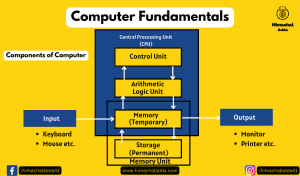
A computer memory is just like a human brain. It is used to store data and instructions. Computer memory stores data and instruction required during the processing of data and output results. It also relates to many devices that are responsible for storing data on a temporary or a permanent basis.
Types of Memory
Memory is primarily is of two types:- Primary Memory and Secondary Memory.
1) Primary Memory
The memory unit that communicates directly with the CPU is called primary memory or main memory. Primary memory holds only those data and instructions on which the computer is currently working. It has a limited capacity. Primary memory or main memory is volatile in nature, its means when power is turned off, the contents of this memory are lost. It is generally made up of semiconductor device.Primary memory is further divided into two categories : Random Access Memory (RAM) and Read Only Memory(ROM).

i) RAM (Random Access Memory)
Random Access Memory, is a hardware device generally located on the motherboard of a computer and acts as an internal memory of the CPU. It allows CPU store data, program, and program results when you switch on the computer. It is the read and write memory of a computer, which means the information can be written to it as well as read from it.
RAM is volatile, i.e. data stored in it is lost when we switch off the computer or if there is a power failure. Hence, a backup Uninterruptible Power System (UPS) is often used with computers. RAM is small, both in terms of its physical size and in the amount of data it can hold.
RAM is of two types −Static RAM (SRAM) and Dynamic RAM (DRAM)
a) Static RAM (SRAM) – Static RAM (SRAM) is a type of random access memory that retains its state for data bits or holds data as long as it receives the power. It is made up of memory cells and is called a static RAM as it does not need to be refreshed on a regular basis because it does not need the power to prevent leakage, unlike dynamic RAM. So, it is faster than DRAM.
b) Dynamic RAM (DRAM) – DRAMs are made up of memory cells, which are composed of one capacitor and one transistor. DRAM must be refreshed continually to store information. DRAM is slower, less expensive and occupies less space on the computer.
ii) Read Only Memory (ROM)
it is also known as non-volatile memory. it does not lose its contents when power is switched off. It is called read only memory as we can only read the programs and data stored on it but cannot write on it. The manufacturer of ROM fills the programs into the ROM at the time of manufacturing the ROM. After this, the content of the ROM can’t be altered, which means you can’t reprogram, rewrite, or erase its content later. However, there are some types of ROM where you can modify the data.
Type of ROM
a) MROM(Masked Read Only Memory) – It is the oldest type of read only memory (ROM). It has become obsolete so it is not used anywhere in today’s world. The very first ROMs were hard-wired devices that contained a pre-programmed set of data or instructions. These kind of ROMs are known as masked ROMs, which are inexpensive.
b) PROM(Programmable Read Only Memory) – it is also non-volatile in nature. Once a PROM has been programmed, its content can never be changed. It is manufactured as blank memory and programmed after manufacturing. This type of memory is found in video game consoles, mobile phones and high definition multimedia interfaces.
c) EPROM(Erasable Programmable ROM) – it is similar to PROM, but it can be erased many times. EPROM can be erased by exposing it to ultra-violet light for a duration of up to 40 minutes and then rewritten. So, it is also known as Ultraviolet Erasable Programmable ROM.
d) EEPROM(Electrically Erasable Programmable ROM)– EEPROM is programmed and erased electrically. It can be erased and reprogrammed about ten thousand times. Both erasing and programming take about 4 to 10 ms (millisecond).it is the most flexible type of ROM and is now commonly used for holding BIOS.
Some Special Memories
There are also some other memories that help to primary memory, which are as follows:-
- Cache Memory – it is very high speed memory placed in between RAM and CPU. It increases the speed of processing. Cache memory is a storage buffer that stores the data which is used more often, temporarily and makes available to CPU at a fast rate.
- Flash Memory – it is a kind of semiconductor based non-volatile rewritable memory, used in digital camera, mobile phone, printer etc.
- Virtual Memory – it is a technique that allow the execution of processes that are not completely in main memory. One major advantage of this memory is that programs can be larger than main memory.
2) Secondary Memory
it is also known as secondary storage or auxiliary memory. It used for storing data and instructions permanently.
Data in secondary memory cannot be processed directly by the CPU, it must first be copied into primary memory i.e. RAM, then CPU can access.
It is non-volatile, so permanently stores the data even when the computer is turned off or until this data is overwritten or deleted.
Some of the secondary memory or storage devices are described below:

- Hard Disk – The hard disk is also known as a hard drive. It is a rigid magnetic disc that stores data permanently, as it is a non-volatile storage device. It is a data storage devices used for storing and retrieving digital information using rotating disks coated with magnetic material. It is a fixed disk i.e. cannot be removed from the drive.
- Floppy Disk – it is round in shape and thin plastic disk coated with iron oxide. It is used to store data but it can store small amount of data and it is slower to access than hard disk.
- SSD (Solid State drive) – SSD (Solid State Drive) is also a non-volatile storage medium that is used to hold and access data. Unlike a hard drive, it does not have moving components, so it offers many advantages over SSD, such as faster access time, noiseless operation, less power consumption, and more.
- Pen Drive – It is also known as a USB flash drive, thumb drive or a jump drive. It connects to a computer via a USB port. It is commonly used to store and transfer data between computers.
The data storage capacity of the pen drive generally ranges from 2 GB to 128 GB. Furthermore, it is a plug and play device as you don’t need additional drives, software, or hardware to use it.
- Compact Disk(CD)- it is a portable secondary storage device in the shape of a round medium disk. A CD is capable of being used as a data storage device alongwith storing of digital audio.CD was co-developed by Philips and Sony in 1982. The first CD was created on 17 August 1982 at the workshop of Philips in Germany.
CD is categorized into three main types-:
i) CD-ROM(Compact Disc – Read only memory)
ii) CD-R(Compact Disc – Recordable)
iii) CD-RW (Compact Disc – Re Writable)
- Digital Video Disc (DVD) – DVD is short for digital versatile disc or digital video disc. It is a type of optical media used for storing optical data. Although it has the same size as a CD, its storage capacity is much more than a CD. So, it is widely used for storing and viewing movies and to distribute software programs as they are too large to fit on a CD. DVD was co-developed by Sony, Panasonic, Philips, and Toshiba in 1995.
DVD comes in three varieties are as follows :
i) DVD-ROM( Digital Video Disc – Read only memory)
ii)DVD-R( Digital Video Disc- Recordable)
iii) DVD-RW( Digital Video Disc- Re-Writable)