CH-1 Fundamentals of Computers
Q1. What is Computer ? Write its characteristics?
Definition -: A computer is an electronic device that can be programmed to accept data (input), process it, and generate results (output).
Characteristics of Computer :
- Speed: Computers are very fast. They can perform calculations and process data at incredible speeds, making them efficient for various tasks.
- Accuracy: Computers provide accurate results, even up to 20 to 30 decimal places. This precision is essential for scientific calculations, financial modeling, and other applications.
- High Storage Capacity: Computers can store large amounts of data. Whether it’s documents, images, videos, or software, computers offer ample storage space.
- Versatility: Computers can perform a wide range of tasks. They can handle everything from complex scientific simulations to playing games or managing spreadsheets. Their versatility makes them indispensable in various fields.
- Reliability: Computers are reliable when properly maintained. They don’t get tired or make mistakes due to fatigue. However, hardware failures or software glitches can affect reliability.
- Security: Computers can protect data using encryption, firewalls, and antivirus software. However, they are also vulnerable to cyber threats, so security measures are crucial.
Q 2. What are application of computers?
- Education : Computers play a crucial role in education. Students can access online resources, e-books, and educational websites.They facilitate e-learning, online classes, and interactive tutorials.
- Communication: Computers enable communication through email, instant messaging, video calls, and social networking sites, helping people stay connected with family and friends.
- Business: Computers are used in businesses for tasks such as accounting, inventory management, customer service, and communication with clients and partners.
- Healthcare: Computers are used in healthcare for managing patient records, medical imaging, research, and telemedicine, improving efficiency and patient care.
- Engineering and Design: Computers are essential in engineering and design fields for drafting, modeling, simulation, and analysis of structures, products, and systems.
- E-commerce: Computers facilitate online shopping and e-commerce transactions, allowing people to buy and sell goods and services from anywhere with an internet connection.
Q 3. What is CPU? Explain its block Diagram?
- Input Units: Input units are devices that allow users to input data and instructions into the computer. Keyboard is the one of the most commonly used input device.
- CPU : A Central Processing Unit (CPU) is the brain of a computer system. It performs essential functions such as data input/output, processing, and storage.
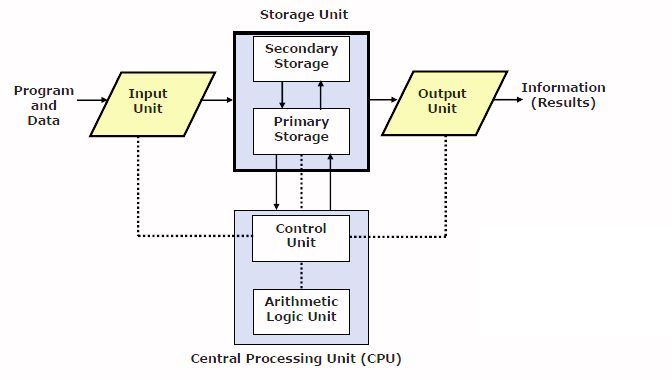
CPU has three parts:
- Memory or Storage Unit:
- The memory unit stores instructions, data, and intermediate results.
- It transfers information to other parts of the computer when needed.
- Also known as internal storage or main memory.
2. Control Unit:
- The control unit manages communication within the CPU.
- It decides which circuits to activate for executing instructions.
- Coordinates the flow of data and instructions.
3. Arithmetic Logic Unit (ALU):
- The ALU performs arithmetic (addition, subtraction, etc.) and logical (comparison, AND/OR operations) tasks.
- It processes data and produces results based on instructions from the control unit.
3. Output Unit : Output unit or device is a device through which results are displayed to user. An Output device is used to show result of processing. Some commonly used output devices are Moniter (VDU), Printer etc.
Q 4. Explain the Generation of computer?
- First Generation (1940s – 1950s): Vacuum Tubes
Computers of the first generation used vacuum tubes for circuitry and magnetic drums for memory. They were large, expensive, and consumed a lot of electricity. Examples include the ENIAC (Electronic Numerical Integrator and Computer) and UNIVAC I (Universal Automatic Computer).
- Second Generation (1950s – 1960s): Transistors
In this generation transistors replaced vacuum tubes, making computers smaller, faster, and more reliable. Magnetic core memory was used for storage, offering faster access to data.
Second-generation computers were still large and mainly used by businesses and governments. The first computer to use transistors was the TX-0 and was introduced in 1956. Other computers that used transistors include the IBM 7070, Philco Transac S-1000 and RCA-501
- Third Generation (1960s – 1970s): Integrated Circuits
In this generation Integrated circuits (ICs) replaced transistors, leading to smaller and faster computers. Operating systems and high-level programming languages like COBOL and FORTRAN were introduced, making computers more user-friendly.
- Fourth Generation (1970s – 1980s): Microprocessors
The fourth generation of computers took advantage of the invention of the microprocessor, more commonly known as a CPU. Microprocessors, along with integrated circuits, helped make it possible for computers to fit easily on a desk and for the introduction of the laptop. Some of the earliest computers to use a microprocessor include the Altair 8800, IBM 5100, and Micral. Today’s computers still use a microprocessor, despite the fourth generation being considered to have ended in 2010.
- Fifth Generation (1980s – Present): Artificial Intelligence
The fifth generation is characterized by advancements in artificial intelligence (AI), parallel processing, and networking.AI technologies like natural language processing and expert systems were developed. Personal computers became more powerful, and the internet revolutionized communication and access to information.
Q 5. What do you mean by memory ? Explain its types.
Computer Memory: Computer memory is like the human brain—it stores data, information, and instructions. It serves as a data storage unit where both input and output can be temporarily stored. Memory is essential for a computer system to function properly.
Types of Computer Memory:
In general, computer memory is of two types:
- Primary memory
- Secondary memory
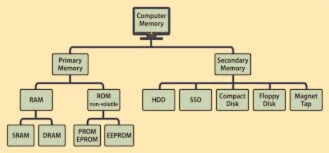
Primary Memory : It is also known as the main memory of the computer system. It is used to store data and programs or instructions during computer operations. It uses semiconductor technology and hence is commonly called semiconductor memory. Primary memory is of two types:
- RAM (Random Access Memory): It is a volatile memory. Volatile memory stores information based on the power supply. If the power supply fails/ interrupted/stopped, all the data and information on this memory will be lost. RAM is used for booting up or start the computer. It temporarily stores programs/data which has to be executed by the processor. RAM is of two types:
- SRAM (Static RAM): SRAM uses transistors and the circuits of this memory are capable of retaining their state as long as the power is applied. This memory consists of the number of flip flops with each flip flop storing 1 bit. It has less access time and hence, it is faster.
- DRAM (Dynamic RAM): DRAM uses capacitors and transistors and stores the data as a charge on the capacitors. They contain thousands of memory cells. It needs refreshing of charge on capacitor after a few milliseconds. This memory is slower than SRAM.
2. ROM (Read Only Memory): It is a non-volatile memory. Non-volatile memory stores information even when there is a power supply failed/ interrupted/stopped. ROM is used to store information that is used to operate the system. It is also known as permanent memory. ROM is of four types:
- MROM(Masked ROM): Hard-wired devices with a pre-programmed collection of data or instructions were the first ROMs. Masked ROMs are a type of low-cost ROM that works in this way.
- PROM (Programmable Read Only Memory): This read-only memory is modifiable once by the user. The user purchases a blank PROM and uses a PROM program to put the required contents into the PROM. Its content can’t be erased once written.
- EPROM (Erasable Programmable Read Only Memory): EPROM is an extension to PROM where you can erase the content of ROM by exposing it to Ultraviolet rays for nearly 40 minutes.
- EEPROM (Electrically Erasable Programmable Read Only Memory): Here the written contents can be erased electrically. You can delete and reprogramme EEPROM up to 10,000 times.
Secondary Memory
Unlike primary memory, secondary memory is non-volatile, meaning that data stored in secondary memory persists even when the computer is turned off. Secondary memory is used for long-term storage of data, programs, and files that are not actively being processed by the CPU. It provides a large storage capacity but slower access speeds compared to primary memory.
Examples of secondary memory devices include:
- Hard Disk Drive (HDD): HDDs use magnetic storage to store data on spinning disks. They offer high storage capacity and are commonly used in desktop and laptop computers.
- Solid-State Drive (SSD): SSDs use flash memory to store data, offering faster access speeds and better durability than HDDs. They are increasingly popular in modern computers due to their speed and reliability.
- Compact Disc (CD): A CD is a commonly used secondary storage device. It has a circular shape and is made of polycarbonate plastic. The storage capacity of a CD is up to 700 MB of data.
- Floppy Disk : A floppy disk (also casually referred to as a floppy or a diskette) is a type of disk storage composed of a thin and flexible disk made of a magnetic storage medium. It is enclosed in a square or nearly square plastic case lined with fabric to remove dust particles from the spinning disk.
- Magnetic Tapes: Magnetic tape is a long, narrow strip of plastic film with a thin, magnetic coating on it that is used for magnetic recording. Bits are recorded on tape as magnetic patches called RECORDS that run along many tracks. Typically, 7 or 9 bits are recorded concurrently. Each track has one read/write head, which allows data to be recorded and read as a sequence of characters. It can be stopped, started moving forward or backward, or rewound.
Q 6. Explain the units of memory?
Memory units are used to measure and represent data. Some of commonly used memory units are :
- Bit (Binary Digit): The smallest unit of memory in a computer system. A bit can have one of two values: 0 or 1, representing the binary states of off or on, respectively.
- Byte: A byte consists of 8 bits.It is the basic unit of data storage in computer systems. Bytes are used to represent characters, numbers, and other types of data.
- Kilobyte (KB): 1 Kilobyte is equal to 1,024 bytes. KB is commonly used to measure the size of small files, documents, and program code.
- Megabyte (MB): 1 Megabyte is equal to 1,024 kilobytes.MB is commonly used to measure the size of larger files, images, videos, and software applications.
- Gigabyte (GB):1 Gigabyte is equal to 1,024 megabytes.GB is commonly used to measure the size of storage devices, such as hard disk drives (HDDs) and solid-state drives (SSDs), as well as large files and multimedia content.
- Terabyte (TB):1 Terabyte is equal to 1,024 gigabytes.TB is commonly used to measure the capacity of high-capacity storage devices, servers, and data centers.
- Petabyte (PB):1 Petabyte is equal to 1,024 terabytes.PB is used to measure the storage capacity of large-scale data storage systems, cloud storage services, and big data analytics platforms.
- Exabyte (EB):1 Exabyte is equal to 1,024 petabytes.
- Zettabyte (ZB):1 Zettabyte is equal to 1,024 exabytes .
- Yottabyte (YB): 1 Yottabyte is equal to 1,024 zettabytes.
Q 7. What are input and output units? Explain it.
Input Units: Input devices are hardware components that allow users to send signals or data to a computer for various tasks.These devices provide a means for humans to interact with the computer system by inputting information.
Some common input devices include:
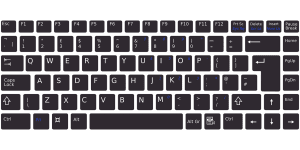
- Keyboard: The keyboard is a familiar input device that resembles a typewriter layout. It allows users to enter alphanumeric data and perform various operations.
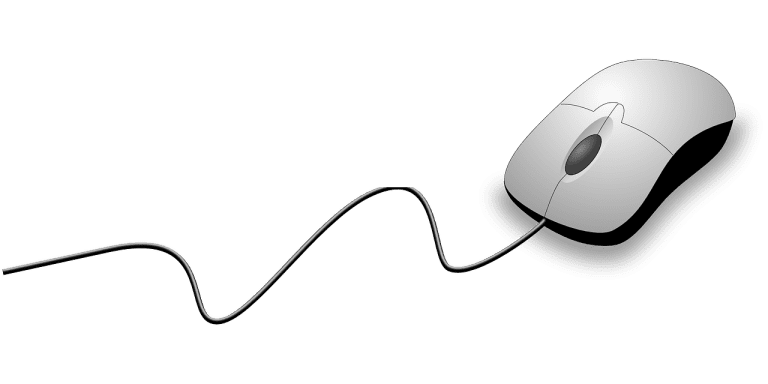
- Mouse: The mouse is a pointing device used to move a cursor across the screen. It enables users to select, click, and drag items.
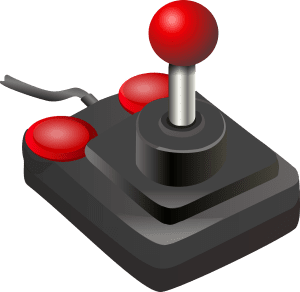
- Joystick: Similar to a mouse, a joystick helps control the cursor on a computer screen. It’s commonly used in gaming and CAD applications.
- Microphone: Audio input devices like microphones capture sound and convert it into digital data.

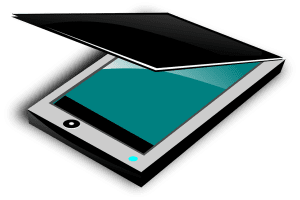
- Scanner: Scanners convert physical documents or images into digital format.
Output Units: Output devices receive processed data from the computer and present it to the user in a human-readable form.These devices display or produce the results of computations or actions performed by the computer.
Common output devices include:
- Monitor/Display: Monitors or displays show visual information, including text, images, videos, and graphics.
- Printer: Printers produce hard copies of documents, images, or other content.
- Speakers: Speakers play audio output, such as music, system sounds, or voice.
- Projector: Projectors display computer content on a larger screen or surface.
Q 8. What is keyboard ? Explain it.
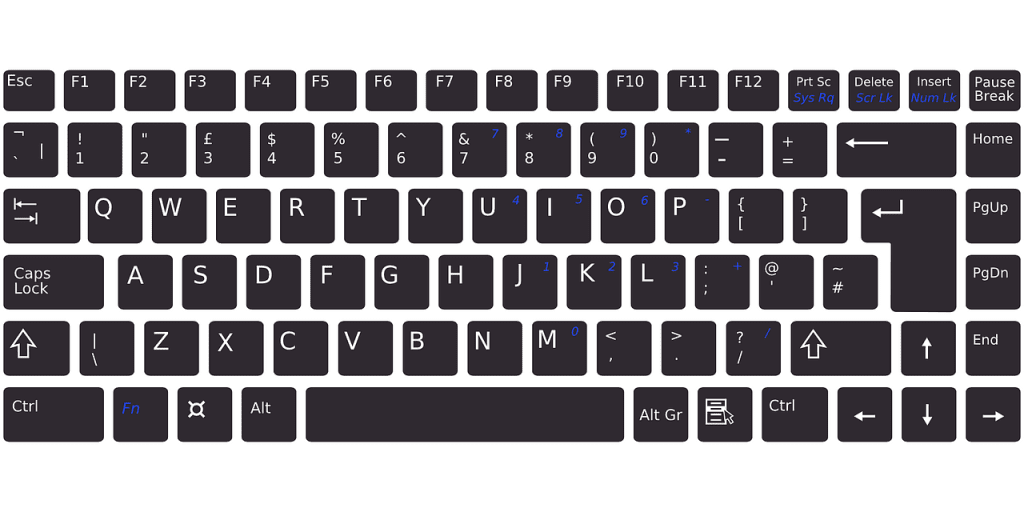
A keyboard is a standard input device used with computers and other electronic devices for typing text, entering commands, and interacting with software applications. It resembles the layout of a traditional typewriter keyboard but has additional keys and functionalities tailored to computer usage. The keys are divided into several sections, including the alphanumeric keys (letters and numbers), function keys (F1 to F12), numeric keypad, navigation keys (arrow keys), and special keys (such as Enter, Shift, Ctrl, Alt, and Spacebar).
- Alphanumeric Keys: Alphanumeric keys include letters (A-Z) and numbers (0-9) arranged in rows on the main part of the keyboard.
- Function Keys (F1-F12): Function keys are a set of keys labeled F1 through F12 located at the top row of the keyboard.They are programmable keys that perform various functions depending on the software application or operating system.
- Numeric Keypad:The numeric keypad is a set of keys arranged like a calculator on the right side of the keyboard.It includes numbers (0-9), mathematical operators (+, -, *, /), and special keys (Enter, Num Lock).
- Navigation Keys:Navigation keys include arrow keys (Up, Down, Left, Right) located in an inverted T-shape, as well as other navigation keys like Home, End, Page Up, and Page Down.They are used for moving the cursor, scrolling through documents, and navigating menus and interfaces.
- Special Keys:Special keys include modifier keys like Shift, Ctrl (Control), Alt (Alternate), and Windows (Win) key, as well as keys like Enter, Backspace, Delete, Tab, Caps Lock, and Spacebar.
Q 9. What do you mean by Scanner? Explain.
A scanner is an input device that scans documents such as photographs and pages of text. When a document is scanned, it is converted into a digital format. This creates an electronic version of the document that can be viewed and edited on a computer.
Types of Scanners:
- Flatbed Scanner: A flatbed scanner has a flat, glass surface where documents or photos are placed face-down for scanning. It is suitable for scanning single-page documents, photos, books, and other flat objects.
- Flatbed Scanner : it works like a photocopier. It can scan and store images from books without removing page from book,
- Line Scanner : it is a small handy scanner and is used in for scanning text line by line.
Q 10. What do you mean by Monitor/ VDU? Explain.
A monitor, also known as a Visual Display Unit (VDU), is an output device used to display visual information generated by a computer. It consists of a screen or display panel that presents text, graphics, videos, and user interfaces for users to interact with.
Types of Monitors:
- Cathode Ray Tube (CRT) Monitors
- Flat-Panel Monitors
Cathode Ray Tube (CRT) Monitors : A CRT monitor is a type of display device that uses a vacuum tube and electron guns to create images.The heart of a CRT monitor is the cathode ray tube, where electrons flow from a heated cathode toward a phosphor-coated screen.
Disadvantages:
- Bulky and heavy design.
- Consumed more power.
- Flickering (due to the refresh rate) could cause eye strain.
- Eventually replaced by LCD monitors, which are thinner, lighter, and more energy-efficient.
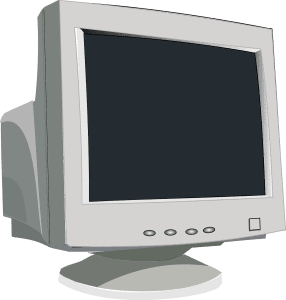
Flat-Panel Monitors : A flat-panel display (FPD) is an electronic display used to show visual content such as text or images. These displays are thin, lightweight, and provide better linearity and higher resolution compared to older CRT Monitors.
Types of Flat-Panel Displays:
- LCD (Liquid Crystal Display): LCD monitors use liquid crystals to control light transmission. They are common in laptops, computer monitors, and TVs.
- Plasma: Plasma displays use small cells filled with ionized gas to emit light. Although less common now, they were popular for large-screen TVs.
- LED (Light Emitting Diode): LED displays are a type of LCD where LEDs are used for backlighting. They offer better energy efficiency and color accuracy.
Q 11. What is printer and explain its types?
A printer is an output device used to produce hard copies of digital documents, photos, and images stored on a computer or other electronic device. It works by transferring digital data onto paper or other media using ink, toner, or other printing technologies. Printers are commonly used in homes, offices, schools, and businesses for printing documents, photos, presentations, and other materials.
There are two types of printers:
- Impact Printers
- Non – Impact Printers
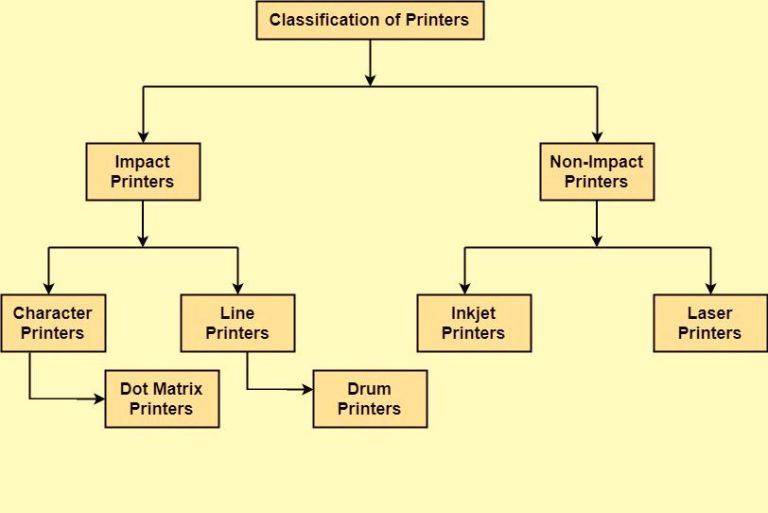
- Impact Printers: The printers that print the characters by striking against the ribbon and onto the papers are known as Impact Printers.
These Printers are of two types:
- Character Printers
- Line Printers
Character Printers : They are the printers which print one character at a time. Example of character printer is Dot Matrix Printer (DMP).
- Dot Matrix Printers : Dot matrix printers use a matrix of tiny pins or wires that strike against an inked ribbon to create dots on the paper, forming characters and images. The pins are arranged in a grid pattern, and by selectively activating the pins, different characters and graphics can be printed.
Advantages:
- Durability: These printers are robust and can handle continuous use.
- Multi-Part Forms: They can create copies on multipart forms (e.g., invoices).
- Low Cost: Initial investment and maintenance costs are relatively low.
Disadvantages:
- Noise: The impact mechanism produces audible sounds during printing.
- Limited Graphics: Dot matrix printers are better for text than complex graphics.
- Slower Speed: They are slower compared to modern inkjet or laser printers.
Line Printers : Line printer can print one line at a time. The line printer is a form of high speed impact printer. They can print 300 to 3000 lines per minute. Example of line printer is Drum printer.
- Drum Printer : Drum printer consist of a Drum which consists of a number of characters, those are printed on the drum. And the number of character or number of tracks are divided, after examining the width of the papers.
Advantages:
- Reliable and Durable
- Low Operating Cost
- Good Quality Printing
- Non – Impact Printers : Non-impact printers are a type of printer that does not physically strike an inked ribbon or paper to create text and images. Instead, they use different methods, such as spraying ink onto paper or applying heat to transfer toner onto paper.
Types of Non- Impact Printers
- Laser printer : These are non-impact page printers. They use laser lights to produces the dots needed to form the characters to be printed on a page & hence the name laser printers.
Advantages:
- Fast Printing: Laser printers can produce pages quickly.
- High-Quality Text and Graphics: Ideal for professional-looking documents.
- Economical for High-Volume Printing: Toner cartridges last longer than inkjet ink.
Disadvantages:
- Expensive
- Cannot be used to produce multiple copies of a document in a single printing.
Inkjet Printers: These printers use a special link called electrostatic ink. The printer head has a special nozzle. Nozzle drops ink on paper. Head contains up to 64 nozzles. The ink dropped is deflected by the electrostatic plate. The plate is fixed outside the nozzle. The deflected ink settles on paper.
Advantages:
- Color Printing: Inkjet printers can produce vibrant color prints, making them ideal for photos and graphics.
- Quiet Operation: They operate quietly compared to impact printers.
- Affordable Initial Cost: Inkjet printers are generally more budget-friendly upfront.
- Compact Size: They are compact and fit well in home offices or small spaces.
Disadvantages:
- Expensive as the cost per page is high
- Slow as compared to laser printer.
Q 12. Differentiate between Impact and Non- Impact Printers?
Impact and Non-Impact Printers are two categories of the printer. Impact printers involve mechanical components for conducting printing. While in Non-Impact printers, no mechanical moving component is used.
| Impact printers | Non-Impact Printers |
|---|---|
| Impact printers produce characters and images on a piece of paper by striking it. | A printer prints text and drawings on paper without striking the paper. |
| It prints by hammering a set of metal pin or character set. | Printing is done by depositing ink in any form. |
| Impact printers produce high-level noise. | Non-impact printers produce low-level noise. |
| They are not suited for printing photograph or any high quality media. | They are best suited for printing photograph or any high quality media. |
| These are low-speed printers and consume a lot of time. | These are very fast printers as they can print many pages in a minute. |
| Dot-matrix printer, Daisy wheel printers, line printer are examples . | inkjet printers, photo printers, laser printers are examples . |
Q 13. What is plotter?
A plotter is a computer output device used to create high-quality, large-scale graphics and drawings. Unlike traditional printers that generate images by spraying tiny dots of ink on paper, plotters use pens, pencils, or other drawing tools to move across the paper, producing continuous, detailed lines.
Advantage:
- It can produce high-quality output on large sheets.
- It is used to provide the high precision drawing.
- It can produce graphics of various sizes.
- The speed of producing output is high.
Q 14. What is the Software? Explain System and Application Software?
Computer software refers to a set of instructions, programs, or data that tell a computer how to perform specific tasks or operations. Software serves as the interface between users and hardware, enabling users to interact with computers and utilize their capabilities effectively.
Types of Computer Software:
System software: System software basically controls a computer’s internal functioning and also controls hardware devices such as monitors, printers, and storage devices, etc. It is like an interface between hardware and user applications, it helps them to communicate with each other because hardware understands machine language(i.e. 1 or 0) whereas user applications are work in human-readable languages like English, Hindi, French, etc. so system software converts the human-readable language into machine language and vice versa.
Types of System Software:
- Operating System: An operating system is the core software that manages hardware resources, provides user interfaces, and facilitates communication between software and hardware. Examples include Windows, macOS, Linux, iOS, and Android.
- Language Translator :These type of translators helps users to address instructions in a distinct programming language, and the language translator converts them into a machine code. The computer system then examines the given instructions in machine code and executes them.Examples of Language Translators are Compiler, Interpreter, and Assemblers
- Utility Software: Utility software includes tools and programs designed to optimize system performance, manage files, troubleshoot problems, and enhance security. Examples include antivirus software, disk cleanup tools, and backup utilities.
Application Software :
Application software is designed to perform a specific task for end-users. It is a product or a program that is designed only to fulfill end-users’ requirements. It includes word processors, spreadsheets, database management, inventory, payroll programs, etc.
Various Application Software are :
- Word Processing Software: Word processing software allows users to create, edit, and format text documents. Examples include Microsoft Word, Google Docs, and Apple Pages.
- Web Browsers: Web browsers are applications used to access and navigate the internet. Examples include Google Chrome, Mozilla Firefox, Microsoft Edge, and Safari.
- Multimedia Software: Multimedia software includes programs for editing and creating images, videos, and audio files. Examples include Adobe Photoshop, Adobe Premiere Pro etc.