Describe Worksheet of MS Excel
A Worksheet is a single page containing a collection of cells where the user can store, update and manipulate the data. Worksheet is also called a spreadsheet. It is made up of rows, columns and cells. An Excel workbook can contain several worksheets. In Excel, individual data cells in a worksheet are defined and organized with the help of the vertical column and horizontal row that are combined to form a cell reference, unlike A1, B25, or R867.
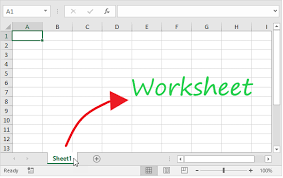
The specifications for Excel Worksheet current versions include:
Number of Rows per Worksheet: 1,048,576
Number of Columns per Worksheet: 16,384
Total cells per Worksheet: 17,179,869,184
A worksheet has the following features and properties:
1. The name of the worksheet appears on its sheet tab at the bottom of the document window. We can rename, move, copy, delete, or insert new worksheets by right-clicking on the sheet tab.
2. The default name of a worksheet is Sheet1, Sheet2, and so on. We can change the name to something more meaningful by double-clicking on the sheet tab or using the Rename command from the right-click menu.
3. Each cell has a unique address called a cell reference, which consists of the column letter and the row number. For example, A1 is the cell reference for the cell in the first column and the first row. we can enter data or formulas in any cell by clicking on it and typing in the formula bar or directly in the cell.
4. we can format the cells to change their appearance, such as font, color, alignment, borders, etc. we can also apply conditional formatting to highlight cells that meet certain criteria or rules.
5. we can use data validation to restrict the type of data that can be entered in a cell or range of cells. For example, we can limit the input to numbers only, dates only, or a list of predefined values.
6. we can sort and filter the data in a worksheet to arrange it in a specific order or display only the rows that match certain criteria. We can also use advanced filters to perform complex queries on the data.
7. We can use formulas and functions to perform calculations and operations on the data in a worksheet. Excel has hundreds of built-in functions for different categories such as math, statistics, text, date and time, logical, financial, etc.
8. we can use macros to automate repetitive tasks or complex procedures in our worksheet. A macro is a set of instructions that allow us to record or write using VBA code. we can run a macro by clicking a button, pressing a shortcut key, or using an event trigger.
9. We can protect sensitive or critical data in a worksheet by applying password protection or restricting editing permissions to specific users.